
01
The five principles
Explore the meaning of each sila and questions about how the principles relate to one another.
AI Pancasila / Conversational learning
Bersama Pandu, jelajahi Pancasila melalui percakapan dan rujukan.
An approachable space to ask about Pancasila, explore its ideas and continue reading beyond the first answer.
AI Pancasila introduces Pandu as a discussion companion. The application presents its learning approach as based on official BPIP documents and provides suggested topics to help users begin.
The learning opportunity
Learning often begins with a small question: what does a principle mean, where did an idea come from, or how do several concepts connect?
A conversational interface gives learners a practical starting point. They can ask in their own words, request clarification and return to earlier discussions as their understanding develops.
AI Pancasila pairs that accessible format with reference-oriented explanations. It can support independent exploration and guided discussion while leaving room to examine original documents and different interpretations.
Meet Pandu
The welcome screen brings together four suggested topics, a question field and conversation history. Users can choose a starting point or introduce a question of their own.
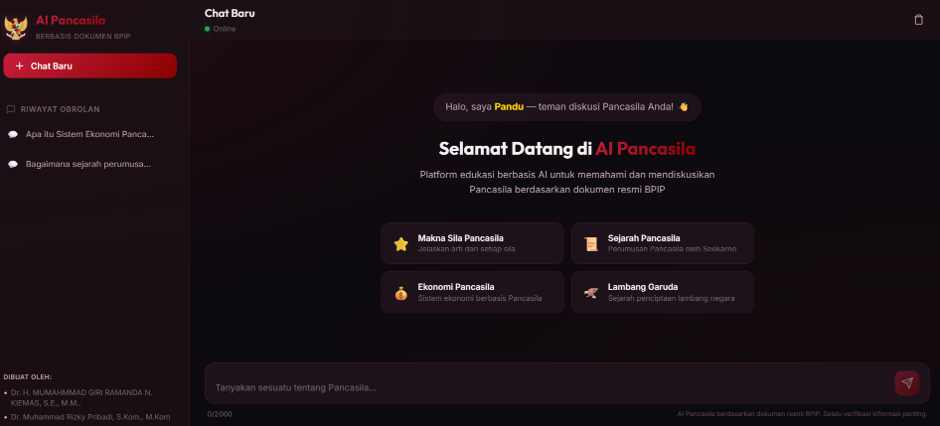
Four starting points
01
Explore the meaning of each sila and questions about how the principles relate to one another.
02
Begin a discussion about the formulation of Pancasila and its historical context.
03
Explore the ideas and terminology associated with an economic system discussed through Pancasila.
04
Ask about the national emblem, its history and the meaning of its elements.
The product experience
01
The application introduces Pandu as a discussion companion. Users can enter their own question or begin with one of the suggested topics.
02
Responses can use headings and lists to organize an explanation, helping users move through a subject in smaller parts.
03
The application describes its knowledge basis as official BPIP documents. Answers can include document titles and page references, offering starting points for further reading.
04
The interface provides conversation history and a new-chat control so users can revisit discussions or begin a separate topic.
05
Helpful and unhelpful feedback controls let users respond to an answer.
06
The application reminds users to verify important information. A named reference is a place to check an answer, rather than a guarantee that every statement is correct.
Ways to use it
Start with one of the suggested topics, ask for clarification and use the references as prompts for further reading.
An educator or facilitator can use a question and response as a discussion starter, then compare the explanation with source material.
Readers can examine the titles and pages provided, check whether they support the answer and identify points that need clarification.
A thoughtful approach
Use Pandu as a learning companion. Keep original documents, educators and critical discussion part of the process.
The public interface states that the application is based on official BPIP documents. This describes its reference basis; it does not establish that the application is an official BPIP service or carries institutional endorsement.
For classroom work, research or public presentation, check important statements against the cited documents and acknowledge the sources you actually consult.
Explore AI Pancasila
Try the public application, or discuss its educational use with Utomo Institute.